How to check your cPanel based email
April 24th, 2008 Filed Under Web, cPanel, osCommerce
Using your web browser,
1) Go to http://www.yourdomain.com/webmail
2) Log in using your username and password.
3) Click on Horde or SquirrelMail
It’s that simple.
*Optional: if you have Outlook, after logging in using your web browser, click on “Configure Mail Client”, then choose “Auto-Configure Microsoft Outlook 2000® for POP3 Access” to automatically have cPanel configure Outlook for you. This involves downloading a registry file and installing it. If you would rather not do this or the auto configuration doesn’t work, then follow the manual configuration instructions.
Final Thoughts: I suggest using Outlook if you have it.
399 Views |
Permalink | Trackback |
|
Print This Article | Leave a Comment
HP BT450 Bluetooth XP Driver
April 22nd, 2008 Filed Under Blog, Sys. Admin
Yesterday, I spent a good 10+ minutes looking for a driver, the HT BT450 Bluetooth Adapter driver. I Google’ed, then I Yahoo!’ed, then I went straight to HP’s support website… always using the keywords: hp bt450 bluetooth xp driver. I either got nowhere or found the Vista version, here. That was until I found this page… and the direct link to the driver, here. I hope this helps someone else, because 10+ minutes of “searching” is way too long especially for a driver! -Thuan
1,520 Views |
Permalink | Trackback |
|
Print This Article | 16 Comments
The Subtract Join
April 8th, 2008 Filed Under Blog, Code, SQL

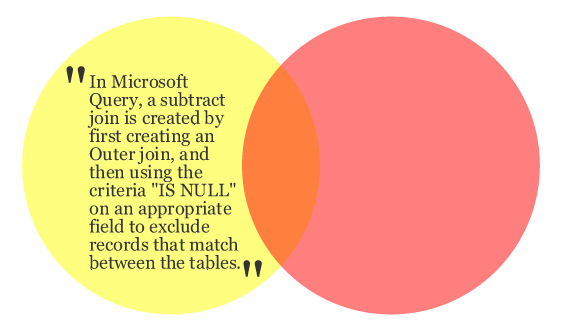
I needed a way of selecting all primary key(s) from a certain table (Table_1) that was not used as a foreign key in a sub-table (Table_2). So I went at it with my SQL know-how to no end. It was obvious that I needed to do a little catching up.
I googled the following:
• all instances of unique id not found in sub-table
• primary key not found as foreign key in sub-table
• select all rows if not exist in sub-table
• sql tutorial
• sql join
• sql reference
• sql relational databases
…and found nothing useful. However, my research did lead me to one conclusion… what I needed was the opposite of a join. I googled for it, it as in “opposite of a join”. What I found was a very useful MS KB, http://support.microsoft.com/kb/136699.
The described “Subtract Join” was exactly what I was looking for and it works! What’s odd is of all the SQL tutorials I ran into, none of them mentioned the SUBTRACT JOIN. That makes me think there might be a better way of doing this query. Is there a better way? Am I simply not using the right keywords when I search? Anyways, if there is I couldn’t find it…
718 Views |
Permalink | Trackback |
|
Print This Article | Leave a Comment
Batch BOL/EOL Editing
April 4th, 2008 Filed Under ASP.net 1.1, Blog, Code
I needed a way of adding periods to the end of every line in text documents. The text documents in question had 100+ lines, so going through each document and pressing ( END > . > ENTER ) repetitively was not ideal. I needed a program, but after some brief googling I gave up and decided that I needed to write this program. I started my project by getting some advice and direction, here, and I am glad I did or else I would have went with my original plan of working with “regex”
…
Private Sub Button1_Click(ByVal sender As System.Object, ByVal e As System.EventArgs) Handles Button1.Click
Dim oFile As System.IO.File
Dim oWrite As System.IO.StreamWriter
Dim Needy As String = tbx_main.Text
Dim Added As String = Regex.Replace(Needy, “(\p{P})(?=\Z|\r\n)”, “.”)
oWrite.Write(Added)
oWrite.Close()
oWrite = oFile.CreateText(“C:\Text_to_Speech.txt”)
End Sub
The end result is a little program that adds any desired character(s) to the beginning or end of all lines pasted into its textbox. The code is as follows…
Try
‘Make sure big tbx is not empty
If tbx_main.Text = “” Then
tbx_main.Text = “Please enter text!”
ElseIf tbx_main.Text = “Please enter text!” Then
tbx_main.Text = “Please enter text!”
Else
‘Make sure small tbx is not empty
If tbx_desired.Text = “” Then
tbx_desired.Text = “Char?”
ElseIf tbx_desired.Text = “Char?” Then
tbx_desired.Text = “Char?”
Else
‘Declare: file, stream and savefiledialog
Dim oFile As File
Dim oMyStream As Stream
Dim saveFileDialog1 As New SaveFileDialog
‘Set savefiledialog defaults
saveFileDialog1.Filter = “txt files (*.txt)|*.txt”
saveFileDialog1.FilterIndex = 2
saveFileDialog1.RestoreDirectory = True
‘Run nested code if user presses OK button in dialog
If saveFileDialog1.ShowDialog() = DialogResult.OK Then
oMyStream = saveFileDialog1.OpenFile()
Dim oWrite As New StreamWriter(oMyStream)
For Each LineInput As String In tbx_main.Lines
‘Core Code, add periods to beginning or end
If rbtn_begin.Checked = True Then
‘Beginning
oWrite.WriteLine(tbx_desired.Text + LineInput)
ElseIf rbtn_end.Checked = True Then
‘End
oWrite.WriteLine(LineInput + tbx_desired.Text)
End If
Next
oWrite.Close()
End If
‘Periods added, display success msgbx, close form
MessageBox.Show(“Success: file was created!”)
Me.Dispose()
Me.Close()
End If
End If
Catch exc As Exception
‘Catch Errors, display messagebox
MessageBox.Show(“Error: file was not created!”)
End Try
Sounds useful? If you want to download the program and use it at your own risk, click here.

298 Views |
Permalink | Trackback |
|
Print This Article | Leave a Comment